Captions Converter for DaVinci Resolve Studio
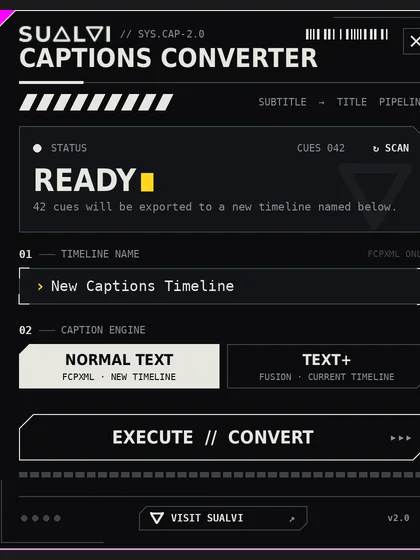
Convert your captions layer in DaVinci Resolve Studio into a normal text or text+ layer with the same content and timing.
Captions Converter Anouncement
SUALVI Sessions ep 11 Where the Captions Converter Tool is annoucement and showcased.
SUALVI Captions Converter: System Requirements
Requirements
- DaVinci Resolve 18 or newer. The free version and Studio both work.
-
Python 3 (64-bit)(If you dont't have it yet), installed from python.org. Versions 3.10 to 3.12 are recommended.
- Windows: during installation, tick "Add python.exe to PATH".
-
Mac: use the python.org installer. If you use Homebrew's Python instead, also run
brew install python-tk, or the tool won't open.
- Windows 10/11 or macOS. macOS support is currently in beta.
Restart DaVinci Resolve after installing Python.
Installing
- Open DaVinci Resolve and go to the Fusion page.
- Drag
SUALVI Captions Converter - Installer.luainto the Nodes area. - Open the tool from Workspace › Scripts › SUALVI › Captions Converter.
FAQ
-The tool isn't in the Scripts menu.
Restart DaVinci Resolve. If it's still missing, check that the file is in the folder shown above.
-I click the tool and nothing opens.
Resolve can't find Python. Open Workspace › Console and click Py3: if you see an error, reinstall Python using the steps above, then restart Resolve.
-The tool says OFFLINE.
Open a project and a timeline, then launch the tool from Workspace › Scripts inside Resolve.
-The tool says NO SUBTITLES.
Your captions need to be on subtitle track 1 of the current timeline.
-Some Text+ captions were skipped.
Those captions overlap another caption in time. Fix the overlapping timestamps in your subtitle track and run it again.
-Mac: the window has a title bar, or I can't type in the name field.
macOS support is in beta. Please contact me with your macOS and Resolve versions.
Support: contact page